During my GPS Drive in South-Eastern Lancaster, I crossed over Octoraro Lake bridge on Rt. 472, and when I neared Colerain on Kirkwood Pike, I decided to turn around in one of the new developments being built.
My GPS indicated that I could easily do a loop and end back on Rt. 472, and as I did, I found this wonderful abandoned barn in the ravine of the development.
After parking and grabbing my camera, I just started to walk around the barn, looking to capture some of the aged beauty of this building.
Hinge and WindowHinge and WeedsWindow TetrisWeathered SiloEmpty Basketball Frame
Looking at the rest of the development, I am not sure how long this barn will remain…
It has been very dry in Chester County for a while now, and when it did rain last night, I had thoughts of where to find some water to finally take pictures of in the area.
Early in the morning, I put my photography gear in the car, along with drinks and snacks and I was off.
By the time I finished my quick errands around town, it was overcast, 85°F+ with slightly high humidity, and I knew I really wanted to play with my new 10-stop neutral density filter, and I knew my first stop.
Downingtown Dam
The Downingtown Dam, which is just west of the center of town, along Rt. 282/Creek Road was my first stop.
I parked in the little spot near the road, packed up my vest, grabbed my tripod, and was off along the little path through the woods.
120727 Downingtown Damn HDR 06
Tech Note – The Downingtown Dam image is a HDR collection of (3) three images taken at 180 sec, 120 sec and 60 sec (f22 ISO100), combined in Photoshop, with Tone Mapping done with Nik Software HDR Efex 2.
I had been there a day or two earlier with my kids, when we took advantage of the swimming area just above the damn, and I also knew I could get a good measurement of what to expect further up-stream for possible later shoots.
The water level was definitely higher, my guest 2-3 inches, and most of the concrete on the damn was cover, with places blocked by small branches.
On the downside of the damn, it was still easy to cross the river with all the bare rocks still visible, and I quickly situated myself on the one large concrete slab near the middle.
As I setup, and looked around, I knew I was not going to get much, but I pushed on with the session.
During my time, I did finally get an exposure into the 4 minute range with the sun nearly right over head, but still not slow enough for somethings I want to do.
After about 45 minutes of shooting, I headed back to the car, and headed further upstream.
I stopped at several more places along Creek Road, checking the water levels. On several occasions, I had to deliberate, if it was worth the walk through thick poison ivy and oak, for a mediocre shoot.
When I reached the west side of Glenmoore, I turned around, and headed back on a GPS drive to my next adventure.
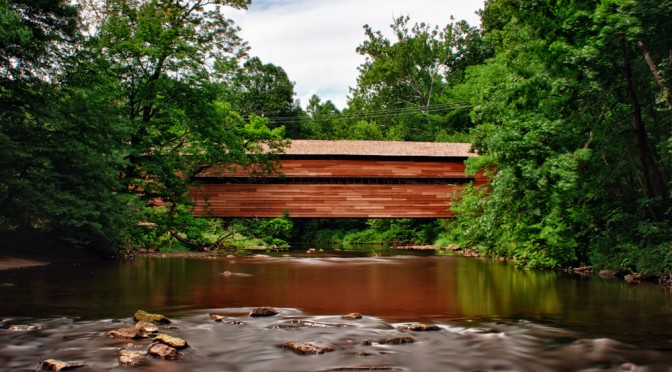
In Chester County, there are many wonderful, scenic roads, and Pughtown Road, off of Rt 100 (Pottstown Pike) is one of them, and along the way, one will find Hollow Road, on which Sheeder-Hall Covered Bridge can be found. The best place to park, in the little area on French Creek Road.
Sheeder-Hall (1850) – Looking Downstream
Tech Note – A series of (5) shots ranging from 1/15th to 1 second (f25 ISO100), combined in Photoshop, with Tone Mapping done with Nik Software HDR Efex 2.
Once again, I got my vest and tripod out, and headed down one of the little paths that lead to the downstream side of the bridge.
I waded into the water, and took some more documentary style images, looking upstream, and then headed back to capture some more interior shoots.
Eventually, I crossed the bridge, took some more shoots and headed back, and as I did, I turned, and saw this view. The traffic was lite, so doing the required multiple exposures for HDR work was easy, and then I was done for this session.
Rapps Dam Covered Bridge
Rapps Dam Covered Bridge in Phoenixville was another bridge that I photographed back in 2010, and since that time, Rapps has been restored, and I finally got a chance to visit to see the new construction!
Rapps Covered Bridge hdr 12 – Under the Bridge
Tech Note – The Underneath shoot was another series of (7) HDR shoots, taken between 1 second and 60 seconds at f22 ISO100. Combined in Photoshop and tweaked with Nik Software HDR Efex 2.
When one is walking near the bridge, you can still smell the fresh new wood, combined with a pitch smell as you walk underneath.
Rapps Dam Covered Bridge hdr 18 – Looking Upstream
Tech Note – The Underneath shoot was another series of (6) HDR shoots, taken between 8 seconds and 180 seconds at f22 ISO100. Combined in Photoshop and tweaked with Nik Software HDR Efex 2.
PennDOT took 10 months to replace the 4 steel support beams, remove and replace the cedar roof and redwood timber and siding, along the 106-foot span. The project cost $1,527,257, which was paid for by state funds, and was managed by Bi-State Construction of Easton, PA. The last time the bridge was reconstructed was in 1978.
[contentblock id=1]
Updates
2014 April 29
Apparently, an 18-wheeler decided to take on Rapps Dam… Guess who won…
Over the past couple of days, I have been exchanging phone calls with a potential Photo Restoration client, and today I finally got to met Eleanor and my new project, Michael Moran.
From what Eleanor had told me on the phone, was the original was 16×20 inches, mounted into a new wooden frame some years ago.
When Eleanor arrived, the picture was packaged in bubble wrap and a white garbage bag, being especially careful, since it had rained lightly earlier in the day.
As we sat and talked, I reiterated that it was not very common for people to get pictures done because of the expense and time involved, let alone an immigrant of the 1800s, and especially at a large size!
“I have a call into my brother to confirm that Michael Moran was from Ireland. He married Mary Hughes here in the States. Four children were born and 3 survived to adulthood (one of which was my grandmother). He became the Head Farmer for the Cassatt estate until he died of pneumonia.” – Eleanor
We chatted some more, and when Eleanor left, I knew I was in for a really good adventure with this Restoration project!
The first thing that I wanted to do, was document what I was doing, just encase I was confronted with some issue as I progressed.
Inspection
So, how was I going to get this thing apart?
Turing it over, I inspected how the internal frame was connected to the external picture, and I was able to find five (5) small nails holding the picture to the frame.
Connection Nails
Thankfully, these nails were easily removed with a pair of needle-nose pliers and some careful tugs.
Once the exterior frame was separated from the interior one, the next element to be aware of was the large pane of glass, and when it was removed, and inspected more carefully, had several ripples as a sign of age.
It was also now possible to closely inspect the surface tears and map them to the backside of the frame.
Toward the middle of the image, there was this pair of tears, one going all the way through to the fiber of the cloth backing, and a strange blue mark:
Restore Michael Moran – Tears (Middle)
and near the bottom of the image, there was this tear:
Restore Michael Moran Tears (Bottom)
Note – You can double-click on the pictures to get a larger view of the damage.
Additional Surface Cracks and Water Stains
Some of the damage appears to be simple cracks to the surface, along with other water stains.
Top Edge Damage Detail
When looking at the edges, there is noticeable damage to the cloth used to connect the images to the frame.
Scanning
I always have a concern when I am faced with a large print, especially of this size!
What also makes this digitization more challenging, is the fixed wood frame that the image is suspended on.
Most of the time, I encounter loose original prints that are not mounted, and with the condition of the cloth material, there was no way that I was going to remove this image from the frame for scanning.
The scanner I use, is an old Epson Perfection 4490 Photo, which I bought numerous years ago, and has a scanning bed of approximately 9×13 inches.
Another requirement of this project, was to scan the original to be Printed at 100%, which I knew was going to make for some very BIG files, but I had a plan, and hoped that my scanner was up for the task.
My solution, like many times before, was to break up the scan into four (4) sections: upper-left, upper-right, lower-left, and lower right, and then combine them into one image using Adobe Photoshop layers.
The final concern, and the most important, the scanners depth-of-field, which is exactly the same concept as with cameras, but with desktop scanners, the depth-of-field is very shallow, and the beveled lip on the edge of the scanner was not going to help, even if it was only 2-3 mm above the glass surface.
I lined up the first corner, leaving just a little break between the scanners capture edge and the edge of the print.
Once aligned, I placed a soft folded cloth on top, and then added some weights to gently and evenly press as much of the picture surface to the glass bed of the scanner as possible, and repeated three more times.
Photoshop
Once I had the four (4) quadrants scanned into 16-bit TIFF files, my next step was to combine the scans into one image, making absolutely sure that the images overlapped enough to mask out any softness that might have occurred during the scanning stage.
Restore Michael Moran – Quadrants pre-combined
Thankfully, and once again, my Epson did not let me down!
Once combined, the final image is beginning to take shape.
Restore Michael Moran Working Proof – Before
From here, it is just taking the time to use the various tools within Photoshop to clean-up the various issues caused by cracks, rips, tears and water. For more information on how to handle these issues, please consult the various reference materials that are available on the internet.
Proof Image
After several hours of clean-up and tweaking, the proof image looks like this:
Restore Michael Moran – Proof 01
but remember, it is always the Client that has the final say!
As part of “Daddy Day Camp”, I took the kids up to Lionville Elementary School to practice their biking riding, in prep for taking off the training wheels.
We first started in the upper play ground, and after parking, I unloaded the bikes, and the kids were gone. I had to coach them a little, but with the follow-up tweaks after Sunday’s outing, both kids were doing much better.
Now I was able to grab my tripod and camera and set up for some shooting.
The wind was rather gusty, and was really nicely formed white clouds against a very deep blue sky, and I had my new filter… Tee hee! wink… wink…
With my first few shots, I felt like a complete amateur, because as I would set one thing that, I’d forget about something else, and the shot would be blown, but I got into a rhythm and finally began to click off some shots.
Long exposure 019 – Take of the intersection of Rt 113 and Devon Drive.
Long exposure 022 – Taken from the outfield of one of the Baseball diamonds.
Long exposure 024 – Taken of the Main School Building
Long exposure 035 – Tennis Practice
Most of these pictures were taken at ISO 100 f22 for 30 seconds to 1 minute, the tennis practice image was around 3 second, using the B+W 58mm 3.0 ND MRC 110M Filter.
At one point, I could hear Logan asking me why I was taking pictures of cars, as I set up for my shot looking north on Route 113 with the Devon Rd. intersection in the background.
He was very puzzled, and even more so, when I showed him the pictures later during proofing. The cars just disappeared!
While playing with my new filter, it became very apparent to me, that I was going to need to recalibrate my water shots, and how to do my HDR work with so much potential ghosting issues during processing.
But as they say no gain without pain.
So come back again, and see what new things I’ve done with this new filter of mine!