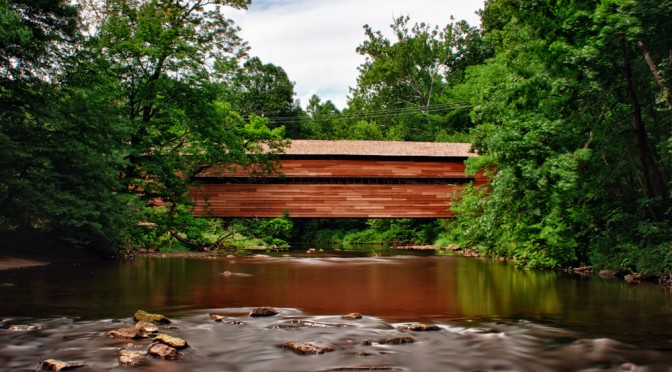
A series of Long Exposures taken of the Marsh Creek Spillway in Chester County, PA.
My first series of images using my new Triggertrap Mobile – Exposures ranging from 0.4-500 seconds, for HDR post capture processing using Adobe Lightroom, Photoshop and Nik Software – HDR Efex Pro 2.
[2012 May 17] – Is Skip the next Carl Bernstein? or Bob Woodward?
or the mysterious man in the shadows….
Skip at a private fundraiser (5/17/2012)
[2012 August 30] – Skip had heard via various sources, that there was a party in town… Even with a hurricane blowing into town, he was able to witness history in the making…
Skip At The Republican National Convention (08/30/2012)
[2012 September 24] – So Skip… What is your call on this one…
Skip, what is your call on this one? (09/24/2012)
[2012 October 14] – Once again Skip shows his desire to be at the edge of everything…
Skip – Space Jump
[2012 October 30] – As fate would have it, Skip was one of the last people able to fly into New York City, and Hurricane Sandy could be seen in the distance.
[2013 July 21 02:02 AM] – Geraldo and Skip after Last-call
Geraldo and Skip after Last-call
[2013 July] – Skip takes pictures of Weiner
Skip’s Weiner pictures
[2013 August 19] – Shark, Shark, Skip!
Shark, Shark, Skip!
[2013 August 23] – The Royal Birth
Skip’s New Cousin!
[2013 August 29] – An Early Birthday present
Happy 48th Skip!
At one with Nature
During a recent trip, Skip was able to meetup with old friend, Bryan!
Skip with his friend Bryan
While checking on the ‘neighborhood’, Skip Middleton startled some of the local wildlife, some of whom where NOT happy with his kind of paparazzi…
Skip with Bigfoot
Skip in Space
With the help of S.R. Hadden, of Hadden Industries, Skip was able to take a quick trip, and capture this Kodak moment (See Date-line entry above).
Not many people realized, Skip left the planet, for his real mission, which had begun many years before… He was eager to compare notes with Dr. David Bowman later on in the “day”.
Skip with Tycho Monolith Anomaly 1 (TMA-1)
In an email/text to his mother, Skip, said “You should meet HAL! It’s so cool to talk with a computer! Should be Home in a couple of days! L8ter! – Skip”
Skip with HAL9000
Snapshots of Life
[No GPS data available] – Skip on alert!
Skip on Alert!
[Budapest] – During one of Skip’s many adventures, he ran into this timeless traveler.
Skip – Budapest
[Justin Bieber] – Ever since Justin Bieber’s songs first appeared in 2008, Skip has been a big fan. Then there was the big night, where Justin invited Skip to one of his concerts, and gave him an “All Access Pass”! Needless to say, Skip was thrilled, and even managed to capture this image.
Skip & Justin Bieber
Skip in the Movies
Skip does not always talk about his screen, but when he does, it is sure to be epic!
During my GPS Drive in South-Eastern Lancaster, I crossed over Octoraro Lake bridge on Rt. 472, and when I neared Colerain on Kirkwood Pike, I decided to turn around in one of the new developments being built.
My GPS indicated that I could easily do a loop and end back on Rt. 472, and as I did, I found this wonderful abandoned barn in the ravine of the development.
After parking and grabbing my camera, I just started to walk around the barn, looking to capture some of the aged beauty of this building.
Hinge and WindowHinge and WeedsWindow TetrisWeathered SiloEmpty Basketball Frame
Looking at the rest of the development, I am not sure how long this barn will remain…
No, I am not searching for the TV Remote, this time…
But a for a new Remote for my photography work.
Back when I first purchased my Canon XTi in 2007, I also purchased both the
Remote Switch RS-60E3 and Wireless Remote Controller RC-1, and have used them various times over the years, but after seeing a couple of recent Posts on Facebook and Google+, the thoughts of looking for something new has begun.
In reading the Posts, I was also left with what kind? A dedicated stand-alone unit or connected to my iPod Touch, and did I want to be able to program the unit?
Dedicated Stand-alone
The first article that I read was on Stand-alone units, “6 top remote releases tested and rated” on photozz.com that got me thinking about upgrading my old Canon Remote Switch RS-60E3.
In my daily reading, I also spotted a Google+ post in which the author announced that they had just received their TriggerHappy, and was excited to try it out.
In following the thread, I was also made aware of the Triggertrap Mobile combination, so my researching began.
Making the Connection
In the case of the Hähnel Giga T Pro II, there are two parts, the wireless transmitter and the receiver that sits on the camera. The unit easily does remote triggering, interval, and long exposures, but does lack any direct HDR functionality.
With both TriggerHappy and Triggertrap, you need cable from the camera to the Control device (iOS (or Android)), and there is a significant range in price for cables.
Cables
To connect my iPod Touch, the cables from TriggerHappy (E3) would cost $49.95, while the Triggertrap’s would require two different cables, a Triggertrap Mobile Dongle ($9.99) and a CL-E3 Camera Cable ($9.99). The easy price winner is Triggertrap.
Software
The Trigger Happy Remote App on iTunes is Free, and is currently at v 1.0.2 (8/8/12), while the Triggertrap (v 1.2.0 (8/2/12)) is available in two versions: Free (limited to 3 trigger modes (Cable Release, vibration sensor and time-lapse) and the Full Premium version at $9.99 on iTunes. The winner here is Trigger Happy, how do you beat Free!
Interface
Both software applications seem to be able to perform Remote trigger, Bulb, time-lapse, plus HDR captures, which is something that I am very interested in.
When looking at the HDR controls, the TriggerHappy app seems to allow 1/3 step increments, which allows for finer control, while the Triggertrap seems limited to full stops, so the Edge here seems to be TriggerHappy.
The real separation between the two applications seems to be the various triggers that are available, and the edge in this case seems to be Triggertrap with 5 sensors (Sound, Shock/Vibration, Metal/Magnetic), 4 modes (HDR Time-lapse, Distance-lapse, Motion detection, Cable release and Star Trail), as well as Facial Recognition.
Conclusion
I like the wireless concept of the Hähnel Giga T Pro II, but the price and lack of HDR capabilities takes it out of consideration.
A big concern of mine, when looking at both these systems, is having to carry and connect my iPod Touch, which my not seem like allot, but when you are standing in 2-3 of water in a rushing stream/river, it could be an issue. I also have to wonder what to do during the winter, when the iPod might be exposed to colder temperatures.
The TriggerHappy does seem to support finer exposure controls, with the 1/3 stop settings, but basic HDR exposures should be able to compensate for that, if correctly bracketed.
With all that has been written above, it seems that at this point, the Triggertrap system would be the most versatile and cost efficient purchase, and will be purchased shortly after the posting of this blog entry.
As always, questions and comments are welcome and encouraged!
It has been very dry in Chester County for a while now, and when it did rain last night, I had thoughts of where to find some water to finally take pictures of in the area.
Early in the morning, I put my photography gear in the car, along with drinks and snacks and I was off.
By the time I finished my quick errands around town, it was overcast, 85°F+ with slightly high humidity, and I knew I really wanted to play with my new 10-stop neutral density filter, and I knew my first stop.
Downingtown Dam
The Downingtown Dam, which is just west of the center of town, along Rt. 282/Creek Road was my first stop.
I parked in the little spot near the road, packed up my vest, grabbed my tripod, and was off along the little path through the woods.
120727 Downingtown Damn HDR 06
Tech Note – The Downingtown Dam image is a HDR collection of (3) three images taken at 180 sec, 120 sec and 60 sec (f22 ISO100), combined in Photoshop, with Tone Mapping done with Nik Software HDR Efex 2.
I had been there a day or two earlier with my kids, when we took advantage of the swimming area just above the damn, and I also knew I could get a good measurement of what to expect further up-stream for possible later shoots.
The water level was definitely higher, my guest 2-3 inches, and most of the concrete on the damn was cover, with places blocked by small branches.
On the downside of the damn, it was still easy to cross the river with all the bare rocks still visible, and I quickly situated myself on the one large concrete slab near the middle.
As I setup, and looked around, I knew I was not going to get much, but I pushed on with the session.
During my time, I did finally get an exposure into the 4 minute range with the sun nearly right over head, but still not slow enough for somethings I want to do.
After about 45 minutes of shooting, I headed back to the car, and headed further upstream.
I stopped at several more places along Creek Road, checking the water levels. On several occasions, I had to deliberate, if it was worth the walk through thick poison ivy and oak, for a mediocre shoot.
When I reached the west side of Glenmoore, I turned around, and headed back on a GPS drive to my next adventure.
In Chester County, there are many wonderful, scenic roads, and Pughtown Road, off of Rt 100 (Pottstown Pike) is one of them, and along the way, one will find Hollow Road, on which Sheeder-Hall Covered Bridge can be found. The best place to park, in the little area on French Creek Road.
Sheeder-Hall (1850) – Looking Downstream
Tech Note – A series of (5) shots ranging from 1/15th to 1 second (f25 ISO100), combined in Photoshop, with Tone Mapping done with Nik Software HDR Efex 2.
Once again, I got my vest and tripod out, and headed down one of the little paths that lead to the downstream side of the bridge.
I waded into the water, and took some more documentary style images, looking upstream, and then headed back to capture some more interior shoots.
Eventually, I crossed the bridge, took some more shoots and headed back, and as I did, I turned, and saw this view. The traffic was lite, so doing the required multiple exposures for HDR work was easy, and then I was done for this session.
Rapps Dam Covered Bridge
Rapps Dam Covered Bridge in Phoenixville was another bridge that I photographed back in 2010, and since that time, Rapps has been restored, and I finally got a chance to visit to see the new construction!
Rapps Covered Bridge hdr 12 – Under the Bridge
Tech Note – The Underneath shoot was another series of (7) HDR shoots, taken between 1 second and 60 seconds at f22 ISO100. Combined in Photoshop and tweaked with Nik Software HDR Efex 2.
When one is walking near the bridge, you can still smell the fresh new wood, combined with a pitch smell as you walk underneath.
Rapps Dam Covered Bridge hdr 18 – Looking Upstream
Tech Note – The Underneath shoot was another series of (6) HDR shoots, taken between 8 seconds and 180 seconds at f22 ISO100. Combined in Photoshop and tweaked with Nik Software HDR Efex 2.
PennDOT took 10 months to replace the 4 steel support beams, remove and replace the cedar roof and redwood timber and siding, along the 106-foot span. The project cost $1,527,257, which was paid for by state funds, and was managed by Bi-State Construction of Easton, PA. The last time the bridge was reconstructed was in 1978.
[contentblock id=1]
Updates
2014 April 29
Apparently, an 18-wheeler decided to take on Rapps Dam… Guess who won…
Used by Google Analytics to determine which links on a page are being clicked
30 seconds
_ga_
ID used to identify users
2 years
_gid
ID used to identify users for 24 hours after last activity
24 hours
_gat
Used to monitor number of Google Analytics server requests when using Google Tag Manager
1 minute
_gac_
Contains information related to marketing campaigns of the user. These are shared with Google AdWords / Google Ads when the Google Ads and Google Analytics accounts are linked together.
90 days
__utma
ID used to identify users and sessions
2 years after last activity
__utmt
Used to monitor number of Google Analytics server requests
10 minutes
__utmb
Used to distinguish new sessions and visits. This cookie is set when the GA.js javascript library is loaded and there is no existing __utmb cookie. The cookie is updated every time data is sent to the Google Analytics server.
30 minutes after last activity
__utmc
Used only with old Urchin versions of Google Analytics and not with GA.js. Was used to distinguish between new sessions and visits at the end of a session.
End of session (browser)
__utmz
Contains information about the traffic source or campaign that directed user to the website. The cookie is set when the GA.js javascript is loaded and updated when data is sent to the Google Anaytics server
6 months after last activity
__utmv
Contains custom information set by the web developer via the _setCustomVar method in Google Analytics. This cookie is updated every time new data is sent to the Google Analytics server.
2 years after last activity
__utmx
Used to determine whether a user is included in an A / B or Multivariate test.


![Skip with the Hindenburg (1937) [Dean H]](https://sphotos-b.xx.fbcdn.net/hphotos-ash3/533220_10151405418858709_1296291671_n.jpg "Skip with the Hindenburg (1937) [Dean H]")


![Skip in Dealey Plaza, Dallas (1963) [Dean H]](https://sphotos-b.xx.fbcdn.net/hphotos-ash4/304657_10151405585873709_137908795_n.jpg "Skip in Dealey Plaza, Dallas (1963) [Dean H]")